

Think of a web design glossary as your personal translator, turning all that confusing tech-speak into plain English. It's essentially a dictionary for your website, covering everything from 'Above the Fold' to 'Wireframe'. Getting a handle on these terms is the first, and most important, step towards making smart, confident decisions about your online presence.
Your Essential Guide to Web Design Terminology
Welcome to our definitive web design glossary, put together especially for UK business owners, WordPress enthusiasts, and online shop owners. Trying to get your head around web design can often feel like you're learning a completely new language, full of baffling acronyms and technical jargon. We've created this guide to close that gap, giving you the confidence to talk shop with developers, designers, and marketing experts.
When you know the lingo, you can explain what you want far more effectively and make sure the website you get is the one you actually envisioned. It doesn't matter if you're mapping out a brand-new site or just want to improve the one you've got; understanding these core concepts is absolutely vital.
Here's how this resource will help you:
- Communicate Clearly: No more crossed wires. You'll be able to talk to your web team using the right terms, ensuring everyone is on the same page.
- Make Smarter Choices: You'll understand how different design decisions can affect your site's speed, how users interact with it, and even your search engine rankings.
- Manage Your Site with Confidence: Gain the know-how to take control of your WordPress or WooCommerce site without feeling overwhelmed.
We're breaking down all the essential jargon into simple, practical definitions, complete with real-world examples. By the time you're done, you won't just know what these terms mean—you'll understand why they're so important for your site's speed, security, and overall success. And if you ever feel you need a helping hand, you can learn more about our expert website assistance.
Core Concepts in Web Design and Development (A-E)
This section of our web design glossary breaks down the foundational terms that every website is built on, covering A through to E. Getting to grips with these core ideas is the first step in making smart decisions that will directly impact your site's speed, how your customers use it, and ultimately, your business's success.
I've made sure each definition cuts through the technical jargon. We'll look at what each term actually means for a UK business owner running a WordPress or WooCommerce site. From understanding accessibility to making sense of bounce rates, these are the real building blocks of a great online presence.
Above the Fold to Backend Development
Above the Fold
A term borrowed from old-school newspapers, this refers to everything a visitor sees on your website without having to scroll. Think of it as your digital shop window – it's the most valuable space on any page.
For a WooCommerce store, this means your product title, main images, price, and a very obvious "Add to Basket" button absolutely must be visible the moment the page loads. Placing your most important call-to-action here is one of the quickest ways to improve your conversion rates.
Accessibility (WCAG)
Web accessibility is all about making sure your website can be used by everyone, including people with disabilities. In the UK, this isn't just a 'nice-to-have'; it's a critical part of design, influenced by standards like the Equality Act 2010 and what users have come to expect.
Making your site accessible opens it up to the 22% of the UK population who have a disability. This focus on inclusive design doesn't just build a positive brand image; it can also lead to 20-30% higher engagement. Why? Because an accessible site works better for everyone, including those using screen readers or different devices, which in turn helps boost sales.
API (Application Programming Interface)
An API is simply a set of rules that lets different pieces of software talk to each other. For instance, if you have a WordPress plugin showing your Instagram feed, it uses the Instagram API to pull in your latest posts. APIs are the glue that connects your website to essential third-party services like payment gateways (Stripe, PayPal) or email marketing tools.
Backend
The backend is the engine room of your website – everything that happens "behind the scenes" that your visitors never see. It’s made up of the server, your database, and the application's logic. When you update a product price in WooCommerce or publish a new post in WordPress, you're working directly with the backend, which processes your commands and stores the data.
The backend is where your site's functionality and security truly live. A well-oiled backend, like the ones we provide with our managed WordPress hosting, is what keeps your site running smoothly, loading fast, and safe from threats.
Bounce Rate to Caching
Bounce Rate
This is the percentage of people who land on one of your web pages and then leave without doing anything else. They don't click on another page, fill out a form, or interact in any meaningful way. A high bounce rate is often a red flag, suggesting your page content isn't what visitors were looking for, or that the user experience is letting you down.
Caching
Caching is a clever technique for speeding up your website. It works by storing temporary copies of your site's files (like images, scripts, and HTML) so they can be delivered to visitors much faster on their next visit. Instead of your server having to build the page from scratch for every single person, it can serve up a pre-built, saved version. This dramatically cuts down loading times. For a deep dive into performance, learning to analyse a Chrome HAR file can provide some fascinating insights.
Key Terms for Website Functionality and UX (F-L)
Alright, let's keep moving through our glossary. This next batch of terms, from F through to L, really gets into the nuts and bolts of how your website works and, more importantly, how it feels to a visitor. Get these right, and you're well on your way to turning casual browsers into loyal customers.
We'll cover everything from the tiny but mighty Favicon to the foundational concepts of Frontend development and Information Architecture. Understanding these is less about being a tech wizard and more about knowing what makes a great website tick.
Favicon to Frontend
Favicon
You know that tiny little logo you see in a browser tab? That's a Favicon. It's a small detail, but it's a massive part of your site's branding. It acts as a quick visual shortcut, helping people spot your site instantly when they have a dozen tabs open.
For any UK business, a sharp, professional Favicon is a non-negotiable. It’s one of those subtle touches that screams credibility and makes your entire online presence feel more polished and complete.
Fonts (Typography)
Fonts, or more broadly, typography, are all about the style of your text—the typeface, its size, weight, and even the spacing between letters. Good typography is an art; it makes your content a pleasure to read, guides the eye naturally through the page, and subtly reinforces your brand's personality.
Get it wrong, and you've got a site that's a headache to read, especially on a mobile. This can send visitors packing in seconds. A thoughtfully chosen font family, on the other hand, brings consistency and massively improves the look and feel of your site.
Framework
Think of a Framework as a developer's head start. It's a pre-built foundation of code and files that provides a solid, reliable structure for building a website. Instead of starting from scratch, developers can build on top of it, which saves a ton of time and helps ensure everything is built to a high standard.
In the WordPress world, a well-known example is the Genesis Framework. It provides a secure and optimised base for creating custom themes.
Frontend
The Frontend is simply everything your visitors see and click on. It’s the visual layer of your website—the layout, the colours, the buttons, the animations. It's often called the "client-side" because it all comes to life inside the user's web browser, thanks to languages like HTML, CSS, and JavaScript.
HTML to Information Architecture
HTML (HyperText Markup Language)
HTML is the bedrock of the web. It's the standard code used to create the actual structure of a webpage. Using simple "tags," it tells the browser what's a heading, what's a paragraph, where an image should go, and how to create a link. Every single website you've ever visited is built on a skeleton of HTML.
HTTPS (HyperText Transfer Protocol Secure)
You've seen the little padlock in your browser's address bar, right? That's HTTPS at work. It’s the secure version of the standard web protocol (HTTP), and that 'S' means the connection between your browser and the website is encrypted and safe.
Google actively rewards secure sites with better rankings, so having HTTPS is a must for SEO. For any UK business, especially a WooCommerce store handling payments or a site with a simple contact form, it's absolutely essential for protecting customer data and building trust.
Information Architecture (IA)
Information Architecture (IA) is the art and science of organising your website's content so people can find what they need, intuitively. A good IA means clear navigation, logical page structures, and consistent labelling. The goal is to create a seamless journey for the user, free from dead ends and confusion. To get a better grasp on this, it's worth looking into web form design best practices.
A poorly planned IA is a one-way ticket to user frustration and a high bounce rate. If you've noticed people are leaving your site almost as soon as they arrive, your site structure could be the problem. We actually have a whole guide on this, check out our tips on how to reduce your website bounce rate.
Design Principles and Mobile Experience (M-R)
As we continue our journey through the world of web design, this section tackles the essential terms from M to R. These concepts are at the heart of how your website looks, feels, and performs—especially when you remember that most of your visitors are probably browsing on their phones. We'll be looking at the visual and adaptable elements that make or break a modern, user-friendly website.
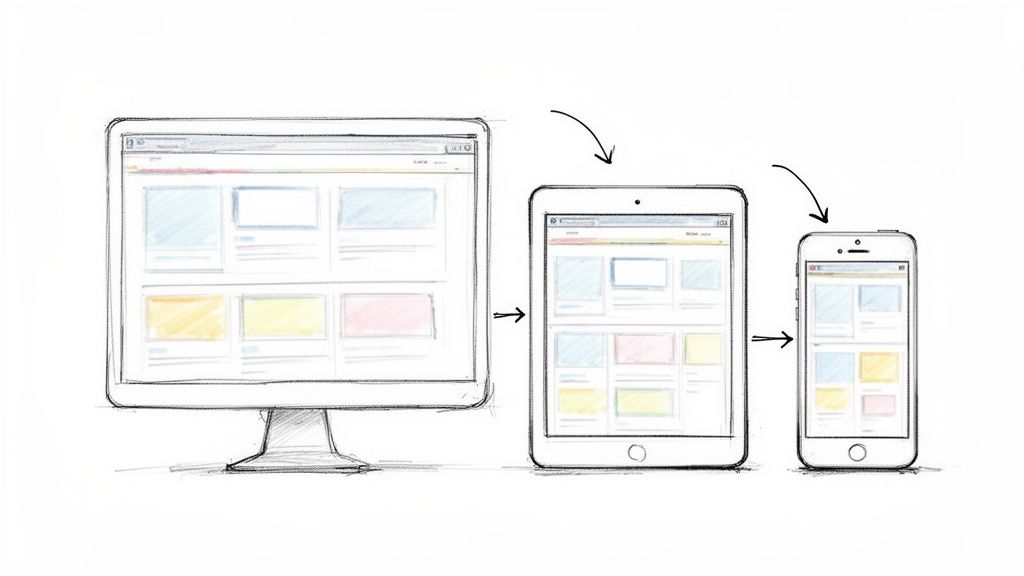
From the first design sketch to the final, fluid layout, getting these terms right is fundamental for any UK business owner. A good grasp ensures your site delivers a seamless experience, regardless of the device your customer is using.
Mockup to Mobile-First Design
Mockup
A mockup is a high-fidelity, static preview of your website. Think of it as a detailed, full-colour visual model. Unlike a wireframe, which is just a basic blueprint, a mockup shows you exactly what the final product will look like, complete with colour schemes, typography, images, and branding.
This stage is crucial for getting stakeholder approval and finalising the visual direction before a single line of code is written. It’s your last chance to make big visual changes easily.
Mobile-First Design
Mobile-first design is a design philosophy that flips the traditional process on its head. You start by designing for the smallest screen—a smartphone—and then scale the design up for tablets and desktops. This approach forces you to be ruthless with your priorities, focusing only on the most essential content and features from the outset.
Given that mobile devices now account for well over half of all website traffic, it’s not just a trend; it's a core principle of modern web design. Starting with mobile ensures the experience is fast and focused for the majority of your users. It’s far easier to add elements for a larger screen than to try and cram a cluttered desktop design into a tiny one.
Navigation and Plugins
Navigation
Navigation refers to the entire system of links, menus, and buttons that helps users find their way around your website. When it's done well, navigation feels intuitive and almost invisible. When it's bad, visitors get lost and frustrated.
Your main menu, footer links, and breadcrumbs are all key parts of your site's navigation. For a WooCommerce store, clear and logical navigation is directly tied to sales—it guides shoppers smoothly from a product page right through to the checkout.
Plugins (WordPress)
In the WordPress world, plugins are apps you can install to add new features or extend functionality, all without needing to write code yourself. There are tens of thousands available, for everything from simple contact forms and SEO tools to powerful ecommerce systems like WooCommerce.
While plugins are incredibly powerful, they come with a few warnings:
- Performance: A few badly coded or too many plugins can seriously slow your website down.
- Security: Out-of-date plugins are one of the most common ways hackers gain access to a site.
- Compatibility: Sometimes, plugins just don’t play nicely with each other or with your theme, causing things to break.
This is why at Vivihosting, our managed WordPress hosting handles proactive plugin updates for you, helping to keep your site secure and performing at its best.
Responsive Design
Responsive Design
Responsive design is the practice of building a website so that its layout automatically adapts to fit the user's screen. The content will look great and be easy to use whether it's on a 4-inch smartphone, a 10-inch tablet, or a 27-inch desktop monitor.
Using flexible grids and clever CSS, the design reformats itself on the fly. This means no more awkward pinching, zooming, or horizontal scrolling for your visitors. It’s absolutely essential for a good user experience and a massive factor for SEO, as Google heavily favours mobile-friendly sites in its search results.
Essential Terms for SEO and Site Structure (S-Z)
And here we are, at the final stretch of our web design glossary, covering everything from S to Z. These last few terms are absolutely crucial for how search engines find your site and how your visitors experience it. Nailing these isn't just a box-ticking exercise; it directly impacts your visibility, customer trust, and ultimately, your bottom line.
We'll break down some big hitters like SEO and SSL Certificates, and also clarify the often-confused roles of UI and UX. Getting your head around these concepts is the key to building a website that doesn't just look the part, but performs brilliantly for your UK business.
SEO and Sitemaps
SEO (Search Engine Optimisation)
At its heart, SEO is the art and science of tweaking your website so it shows up higher when people search on Google for what you offer. The more visible you are in search results, the more likely you are to attract potential customers and keep existing ones coming back.
Good SEO isn't just one thing; it's a mix of different activities:
- On-Page SEO: This is all about what's on your actual pages—using the right keywords, writing compelling meta descriptions, and making sure your site loads quickly.
- Off-Page SEO: This involves building your reputation online, primarily by getting high-quality links from other trustworthy websites.
- Technical SEO: This is the behind-the-scenes stuff, like ensuring search engines can easily crawl and index your site. A sitemap is a big part of this.
Sitemap
Think of a sitemap as a roadmap of your website, built specifically for search engines. It's a simple file that lists all your pages, videos, and other content, helping Google and others to crawl your site more intelligently and discover everything you've published. If you're on WordPress, a plugin like Yoast SEO can create and manage this for you automatically, which is a massive help.
Security and Development Tools
SSL Certificate (Secure Sockets Layer)
An SSL certificate is what provides the secure, encrypted connection between your website and your visitor's browser. It’s the little padlock you see in the address bar and what turns HTTP into HTTPS. This security is vital for protecting sensitive data, like login details or credit card information, from prying eyes.
For any UK business—and especially if you run a WooCommerce shop—an SSL is simply non-negotiable. Google gives a slight ranking boost to secure sites, but more importantly, browsers will flag any site without one as "Not Secure." That warning can kill visitor trust in an instant. That's why all our Vivihosting hosting plans include free SSL certificates to get you started securely from day one.
Staging Site
A staging site is a private copy of your live website, a safe little sandbox where you can test things out. Whether you're trying a new plugin, updating your theme, or making big design changes, you can do it all here without any risk to the site your customers are seeing. Once you’re confident everything works perfectly, you can push the changes live.
A staging site is your safety net against costly mistakes. Imagine a plugin update breaking your checkout during your busiest sales period. A staging environment lets you spot and fix that disaster before it ever affects a single customer.
UI and UX: The User-Centred Duo
UI (User Interface)
User Interface (UI) design is all about the look and feel—the visual and interactive parts of your website. It covers everything a user sees and clicks on: buttons, icons, fonts, colour schemes, and the spacing between elements. The main goal of a UI designer is to create an interface that is visually appealing, consistent, and easy on the eye.
UX (User Experience)
User Experience (UX) design, on the other hand, is about the overall feeling a person gets when using your website. It looks at the entire journey, from how easy it is to find what they need to how logical the navigation feels. Good UX makes a site intuitive and efficient to use. It essentially answers the question: "Was that a smooth and pleasant experience?"
UI and UX are two sides of the same coin. A gorgeous-looking site (great UI) is pretty useless if it's a nightmare to navigate (terrible UX). When they work together, you get a website that not only looks professional but also works seamlessly for your visitors, encouraging them to stick around and, hopefully, become customers.
Connecting Website Performance to Business Growth
It’s one thing to know the definitions in this glossary, but the real magic happens when you connect these technical ideas to actual business results. Terms like Caching, CDN, Core Web Vitals, and Load Time aren't just buzzwords; they're the engine parts that power your website's performance and, ultimately, your bottom line.
A fast, responsive website isn’t a nice-to-have anymore—it’s a fundamental part of growing your business. For UK businesses, speed is paramount. Research has shown that a staggering 53% of mobile users will simply leave a site if it takes more than three seconds to load. You can read more about these UK web design trends and their impact on businesses. This is precisely why having solid hosting is non-negotiable.
The Direct Link Between Speed and Revenue
Every millisecond matters. There's a direct and unforgiving relationship between how quickly your site loads and its ability to turn visitors into customers. Even a one-second delay can cause a significant drop in engagement and sales—a critical point for any WooCommerce store owner.
This is what Google's Core Web Vitals are all about. They measure the real-world user experience by looking at loading speed, interactivity, and visual stability. If your site falls short of these standards, your SEO rankings can suffer, making it harder for potential customers to find you in the first place.
A slow website sends a quiet message to your visitors: their time isn't important. In contrast, a snappy, seamless experience builds instant trust, encouraging them to stick around, browse, and buy.
How Hosting Choices Impact Your Success
Think of your hosting environment as the foundation of your website. Your choices here, from server location to the security measures in place, have a direct and measurable effect on your business.
For instance, choosing a UK-based server from a provider like Vivihosting means your data has less distance to travel to reach local customers, leading to faster load times. In the same way, using advanced caching and a Content Delivery Network (CDN) ensures your content gets delivered quickly, wherever your visitors happen to be.
The following table paints a clear picture of just how much load time can affect critical business metrics.
Impact of Load Time on Key Business Metrics
| Load Time (Seconds) | Bounce Rate Increase (vs. 1s) | Conversion Rate (Typical) |
|---|---|---|
| 1 | 0% | 3.50% |
| 2 | 32% | 3.05% |
| 3 | 90% | 1.82% |
| 4 | 113% | 0.67% |
As you can see, the drop-off is brutal. Investing in your website's performance isn't just a technical tweak; it's a core business strategy. If your site isn't up to scratch, our expert website optimisation service can pinpoint the problems and implement solutions that deliver real growth.
Navigating Web Design and Development Costs
Getting your head around the terminology in this glossary is one thing, but understanding the money involved is just as critical for any UK business. The cost of designing and developing a website can swing wildly, and it all comes down to the size and complexity of what you need. Let’s break down what you can realistically expect to pay.
We’ll look at the financial gulf between grabbing a simple, off-the-shelf WordPress theme versus commissioning a fully bespoke, custom-built website. While a template gets you online quickly and cheaply, a tailored site almost always delivers a better return on investment over the long haul. Why? Because you get superior performance, a unique brand identity, and the ability to scale up as your business takes off.
Understanding the Pricing Spectrum
There’s no single price tag for a website; the investment grows with your business needs and goals. For a startup, a local business, or a blogger just getting going, a website built from a pre-made template could be anywhere from £500 to £2,000.
But as a business grows—say, a WooCommerce shop that needs to handle serious customer traffic—the costs naturally go up. You’re looking at £3,000 to £15,000 for a custom design that needs solid functionality and a distinct brand presence.
For large-scale, enterprise-level projects, like a digital agency managing multiple client sites, the investment can easily climb to £15,000 to £100,000+. It's interesting to note that 19.7% of businesses set aside between $2,501–$5,000 a year for web design. That figure translates pretty closely to the same range in pounds, and it's where many small and medium-sized UK businesses find a sweet spot between affordability and quality. For a deeper dive into financial planning, you can find more about UK web design budgeting and trends on invernessdesignstudio.com.
Why a Bespoke Solution Delivers Higher ROI
Choosing a custom-built website over a template isn't just a cost—it's an investment in your company's future. A bespoke site is built from the ground up to meet your specific business objectives and serve your ideal customers, which brings some very real advantages.
- Better Performance: Custom sites are built with clean, efficient code. They don't have the bloat and unnecessary features that often bog down template-based websites, meaning they load faster, which is great for both your visitors and your SEO.
- Unique Branding: A bespoke design ensures your website is a true extension of your brand. It helps you stand out and look professional, rather than blending in with competitors who might be using the same template.
- Built to Scale: As your business grows, a custom site can easily grow with it. Need to add a complex new feature or integrate with another system? It’s much more straightforward when the foundation was built specifically for you.
This infographic shows just how much small differences in load time—often a direct result of your design and development choices—can impact your bottom line.
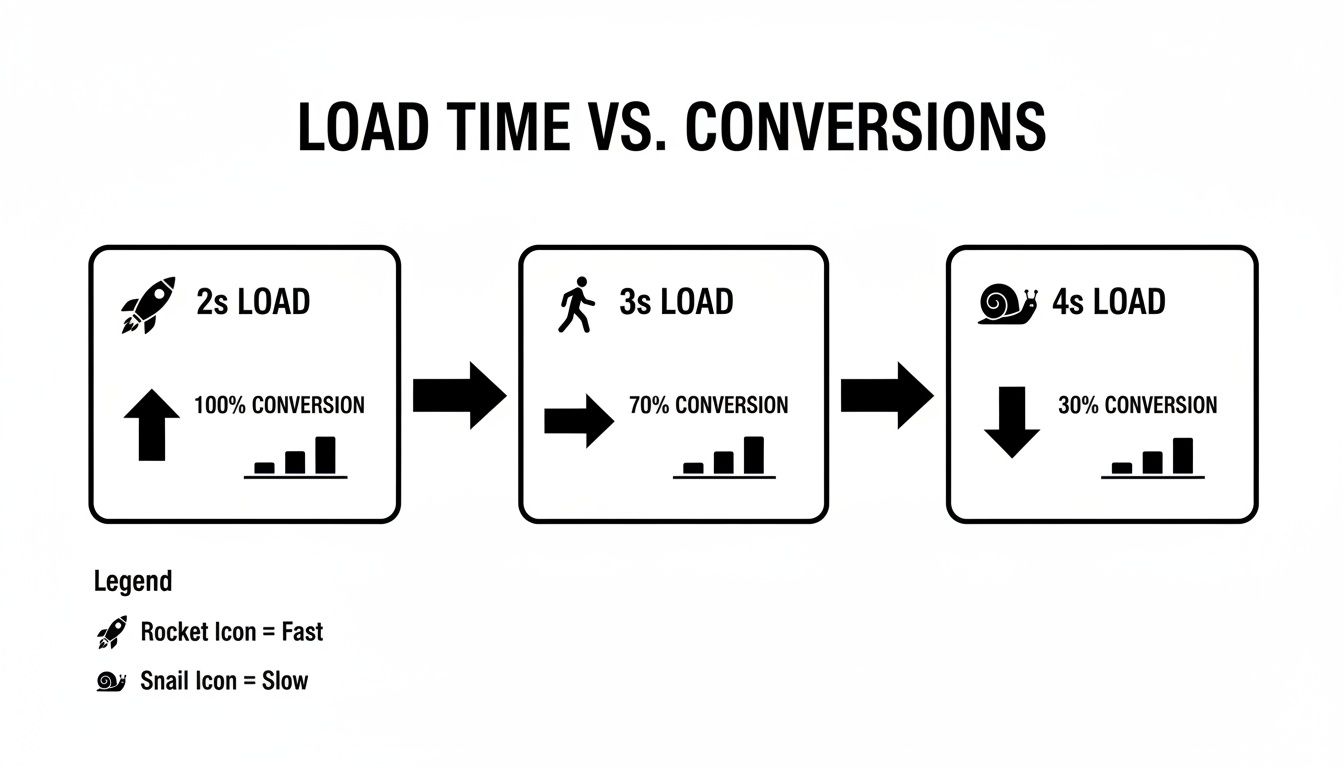
As you can see, even a tiny one or two-second delay can cause a massive drop in conversions. It’s a stark reminder of why putting your money into performance-focused development is one of the smartest business moves you can make.
Your Web Design Questions, Answered
Getting to grips with web design can feel like learning a new language, sparking all sorts of questions. This section cuts through the jargon to give you clear, practical answers to the most common queries we hear from business owners. Think of it as a quick-start guide to making smarter decisions for your website.
We'll unpack some of the most frequently confused terms, explain why certain design fundamentals are non-negotiable for modern businesses, and share some real-world advice on keeping your site in top shape for the long haul.
What Is the Difference Between UI and UX Design?
It's a classic point of confusion, and you'll often hear people use UI and UX as if they're the same thing. They're not, but they are deeply connected.
UI (User Interface) is all about the visuals. It’s the look and feel of your website – the colours, the fonts, the buttons, and how all the graphical elements are laid out. A good UI designer creates a website that looks sharp, professional, and is pleasant to interact with.
UX (User Experience), on the other hand, is about the entire journey. It’s about how easy and intuitive your site is to use. A great UX means a visitor can find what they need without getting frustrated or confused. A site can have a beautiful UI but if the navigation is a mess, the UX is a failure.
Why Is Responsive Design So Important?
Put simply, responsive design is non-negotiable today. Your customers aren't just sitting at a desk anymore; they're browsing on their phones while queuing for a coffee, on a tablet on the sofa, and on laptops of all sizes. A responsive website automatically resizes and rearranges its content to look and work perfectly on any screen.
Without it, mobile visitors are forced to pinch and zoom just to read your text – a surefire way to send them straight to a competitor. Even more critically, Google now uses a 'mobile-first' approach for ranking websites. If your site isn't mobile-friendly, your search engine performance will take a serious hit, making you invisible to potential customers.
How Often Should I Redesign My Website?
The old rule of thumb was a complete website overhaul every 2-3 years to stay current. While that's not necessarily bad advice, a much better approach is to think in terms of continuous, gradual improvement rather than a huge, disruptive project.
This 'agile' way of working involves making smaller, regular updates. You might refresh your brand colours one month, optimise a key service page the next, or work on improving your site speed. This keeps your website feeling fresh and performing well without the major expense and downtime of a full-scale redesign.
What Is a CMS and Why Do I Need One?
A CMS, or Content Management System, is the engine that runs your website, allowing you to add, edit, and manage your content without having to be a coding wizard. WordPress, which powers over 40% of the web, is the most famous example.
Having a CMS like WordPress is incredibly empowering for a business owner. It gives you the freedom to publish a new blog post, update your prices, or change an image whenever you need to. You're no longer dependent on a developer for every tiny change, giving you the agility to run your business effectively.
At Vivihosting, our goal is to ensure your website is a powerful asset, not a technical headache. With our performance-focused managed WordPress hosting and expert support, we take care of the technical side of things, freeing you up to focus on what you do best: growing your business.